
Friday, June 15, 2007
Enabling Conditions for Effective Use of Technology in Schools
My article has been published in the "Teacher-to-Teacher " section of the June issue of Education World magazine. If you do not have a subscription to the magazine then you can read the article online...

Saturday, June 09, 2007
"Tech to the Aid of Children with Autism" - Report on India Together
Wrote up a formal report on the workshop described in my previous post. You can read it here on 'India Together'.
Tuesday, May 29, 2007
Leveraging Technology to Aid Children with Autism (and other disabilities)
[Also posted on educatorslog.in]


Following from the success and lessons from their workshop in Dehradun where they used technology to help kids with autism, Dr. Arun Mehta and his colleagues are currently conducting a similar workshop in Bangalore (May 26-30, 2007). The participants include children of various ages with autism, their parents, special educators, volunteers (from IBM and some independent - like me).
I registered my interest (and shared some software ideas and links) with the group following a comment to this post here on educatorslog.in which announced the workshop and the googlegroup that had been set up to exchange emails, in the weeks leading up to the workshop among the various people interested in this event and initiative. I have had the pleasure, over the last couple of days to volunteer my time - attend some sessions and share my ideas on how some technologies such as Scratch (see my previous post here) could be used as a simple iconic, visual introduction to programming (to create games as well as explore shapes and other ideas around space and geometry).
Computers and other digital technologies with their multi-media affordances, have been known to serve as learning and communication aids for children with disabilities such as autism. Little has been tried out in India, though, and Dr. Arun Mehta and Vickram Crishna (of the Hawkings project and eLocuter fame) and their colleagues are probably the first in India to try to help parents and special educators become familiar with hardware and software that they can use with children with disabilities based on each child's specific needs and condition.
Among the software being discussed and shared at this workshop-
- Natak - a role-playing and drama-making software by C-DAC
- Jaws - software for the visually impaired (audio feedback for keyboard input, screen-reader for audio version of everything on the screen)
- e-Locuter - computer "talks" for a non-verbal user and allows user to give computer inputs through one key. Read this 2004 article by Frederick Noronha.
- Dasher - for keyboard-less typing - user can type using only mouse movements (without clicking)
- Scratch - a fun, simple introduction to programming (see my previous post here)
- Basic photography, image and sound manipulation - preparing powerpoint slide shows with images and sound
- Edubuntu - a complete Linux-based operating system, (freely available with community based support) specially for children - packaged with tons of educational applications and games
 Most or all of the software being shared and discussed is free and open source. Dr. Mehta is in fact planning to customize eLocuter with specific vocabulary lists of everyday words for all the children who have participated in this workshop!
To see technology being leveraged to help children with disabilities has been such a learning, and an eye-opener for me. Kudos to Dr. Arun Mehta and his collegues who are organizing the workshop - Vickram Crishna (of Net Radiophony), Dr. Veronica Mathias (Autism Society of India) and Dr. Nalini Menon (Spastics Society of Karnataka)!
------------------------------------------------------------------------
Some related articles:
Article on the earlier Dehradun workshop
A write up on A for Autism... M for Mouse - a film on this initiative
Use of video modeling to help teach children with autism
A for Autism... M for Mouse
Scratch officially released by MIT Media Lab
[Also posted on educatorslog.in]
You may recall my earlier post here - Children, Computers and Powerful Ideas about kids and programming. I'd mentioned Scratch - a great programming environment for kids of all ages to get creative with computers that was due to be released by MIT Media Lab. Well it's here! Fun, easy, colorful, wysiwyg, lots of features, great online community for sharing your projects.
You may recall my earlier post here - Children, Computers and Powerful Ideas about kids and programming. I'd mentioned Scratch - a great programming environment for kids of all ages to get creative with computers that was due to be released by MIT Media Lab. Well it's here! Fun, easy, colorful, wysiwyg, lots of features, great online community for sharing your projects.
Check out this MIT press release as well as links to Mitch Resnick's videos about the product that are linked from the site and go ahead and download this free, fantastic product...
---------------------Mailer from Mitch Resnick announcing Scratch-------------------------
New software from Lifelong Kindergarten Group at the MIT Media Lab
As you may know, our research group at the MIT Media Lab has been
working for several years on a new programming language, called
Scratch, that enables kids to create their own interactive stories,
games, music, and animations.
This week, we are officially releasing Scratch and launching the
Scratch website (http://scratch.mit.edu), where people can share
their Scratch creations with one another.
Scratch builds on our group's previous work that led to the LEGO
MINDSTORMS and PicoCricket robotics kits. Just as the MINDSTORMS and
PicoCricket kits allow kids to program and control physical
creations, Scratch lets them program and control media-rich creations
on the screen. As kids create and share Scratch projects, they learn
important mathematical and computational ideas, while also gaining a
deeper understanding of the process of design.
I hope you'll go to the Scratch website at http://scratch.mit.edu,
where you can download Scratch software and share projects created
with Scratch.
I look forward to hearing about your experiences with Scratch. If you
have any questions or suggestions, please feel free to contact me.
Mitch Resnick
Professor of Learning Research
Lifelong Kindergarten group
MIT Media Lab
Tuesday, May 22, 2007
Creativity in the Classroom
[Read more on this at educatorslog.in]
Creativity & Innovation seem to be buzzwords today, not just in the world of design, but in the corporate world as well as in education today. I wrote a couple of posts about a year ago on the idea of "possibility thinking" - in this post and this one.
I attended an immensely fascinating workshop on Creativity at the recently held TAISI conference in Bangalore (where I also held a session - on "Technology Tools for Collaboration" - see previous post here). This workshop conducted by Dr. Susan Baum of the International Center for Talent Development was called "Creativity 1,2,3", and was centered around characteristics of creative thinking and creativity in children, and how to nurture these in the classroom.
I found the presentation slides to this workshop. Some slides relating to participant involvement & action during the workshop may not make sense, but there are several slides dedicated to what "creative folks" do and look like, "divergent thinking", brainstorming strategies in the classroom that encourage kids to be creative, and "problem finding (not problem solving) and discovery in science."
The big take-aways for teachers were --
- to provide ample opportunities in the classroom for play and "problem finding" (a more important skill than "problem solving"),
- to teach divergent thinking skills and integrate them into the curriculum, and most of all,
- to model creativity and spontaneity in the classroom.
Sunday, April 01, 2007
Sharing with Teachers New Technology Tools for Collaboration
The 3-day conference titled "Teaching and Learning in the 21st Century" organized by The Association of International Schools of India (TAISI), just concluded in Bangalore today. This was the second conference organized by this newly instituted body, the 1st conference was held in September 2006 in Hyderabad.
I was once again invited to speak in a break-out session, and conducted a workshop on "New Technology Tools for Collaboration", and shared with the audience some of the fascinating web 2.0 tools that the new "read/write" web offers teachers, students and learning environments today.
The session started with a brief discussion on what collaboration in the classroom entails and means, and how a "tool" may help. I started with the popular group tools of the "old web" (listservs/discussion boards, yahoo and google groups), (that still have a place today, I guess), and then fast forwarded to talk about wikis, blogs, social bookmarking and googledocs and spreadsheets. The focus on what students and groups hope to achieve in a collaborative project, and how each of the tools discussed helped the process, resonated with teachers. Information on specific tools such as blogger, edublogs, David Warlick's Classblogmeister, wikispaces, del.icio.us and googledocs & spreadsheets was shared, and also exemplary blogs (that discuss web2.0 in the classroom) such as Will Richardson's weblogg-ed, and projects such as the Flat Classroom Project. That all the tools are free and easy-to-use also caused much relief and excitement.
I touched briefly on communities of practice/learning that could be formed and fostered among educators using blogging and tagging features in an appropriately designed platform, and showcased educatorslog.in as a case in point.
I now look forward to sharing educatorslog.in with an international audience in Boston in July 07 at the November Learning conference on Building Learning Communities.
I was once again invited to speak in a break-out session, and conducted a workshop on "New Technology Tools for Collaboration", and shared with the audience some of the fascinating web 2.0 tools that the new "read/write" web offers teachers, students and learning environments today.
The session started with a brief discussion on what collaboration in the classroom entails and means, and how a "tool" may help. I started with the popular group tools of the "old web" (listservs/discussion boards, yahoo and google groups), (that still have a place today, I guess), and then fast forwarded to talk about wikis, blogs, social bookmarking and googledocs and spreadsheets. The focus on what students and groups hope to achieve in a collaborative project, and how each of the tools discussed helped the process, resonated with teachers. Information on specific tools such as blogger, edublogs, David Warlick's Classblogmeister, wikispaces, del.icio.us and googledocs & spreadsheets was shared, and also exemplary blogs (that discuss web2.0 in the classroom) such as Will Richardson's weblogg-ed, and projects such as the Flat Classroom Project. That all the tools are free and easy-to-use also caused much relief and excitement.
I touched briefly on communities of practice/learning that could be formed and fostered among educators using blogging and tagging features in an appropriately designed platform, and showcased educatorslog.in as a case in point.
I now look forward to sharing educatorslog.in with an international audience in Boston in July 07 at the November Learning conference on Building Learning Communities.
Wednesday, March 07, 2007
Concept Mapping/Mind Mapping as an Educational Tool - The Resources
(Also posted on educatorslog.in)
Inspiration has been an industry leader for years now, but it is not free and not cheap either (I am unsure of actual costs for school use). Their website is a good resource, though, for ideas on how to use such tools in the classroom, and for general reading on the educational benefits of concept mapping. They have also come out with Kidspiration - a version for younger kids. Try the free trial versions just to get a sense for the software.
MindManager - is a paid tool with very pleasing aethetics. I doubt anyone (in schools) will need purchase it, now that there's FreeMind and Mindomo (see below). This also has a free trial version you can download and try.
C-Map - is a FREE, good, easy-to-use tool. The information on the home-page of their website also serves to explain all the features of this tool (it's been put together using C-Map itself!).
FreeMind - is like MindManager, except that its FREE! Make sure you install the Java Runtime Environment (JRE) on your machine before using this.
Mindomo - is available in free as well as paid versions. This is a new web-based concept mapping tool (released barely a week ago) that allows the user to create the maps within the web browser itself, which allows for easy sharing and collaboration. The maps look much like the MindManager maps. I have not tried this tool yet, but it does look very promising; only downside being that it needs Internet access for use which presents a very real constraint for schools in India.
bubbl.us - I was recently sent a link to this new 'brainstorming tool', which is also FREE. It seems to be very user-friendly and aesthetically pleasing too and appears to serve the "thinking process" better than some of the older tools. The features described on the site are shown through a bubbl.us map (so what's new about that?). Like Mindomo, this is also an online tool, which is not so good for people in India with limited or no Internet access.
Have fun mapping your mind!
This is part-2 of the previous post on the use of concept maps in education.
Inspiration has been an industry leader for years now, but it is not free and not cheap either (I am unsure of actual costs for school use). Their website is a good resource, though, for ideas on how to use such tools in the classroom, and for general reading on the educational benefits of concept mapping. They have also come out with Kidspiration - a version for younger kids. Try the free trial versions just to get a sense for the software.
MindManager - is a paid tool with very pleasing aethetics. I doubt anyone (in schools) will need purchase it, now that there's FreeMind and Mindomo (see below). This also has a free trial version you can download and try.
C-Map - is a FREE, good, easy-to-use tool. The information on the home-page of their website also serves to explain all the features of this tool (it's been put together using C-Map itself!).
FreeMind - is like MindManager, except that its FREE! Make sure you install the Java Runtime Environment (JRE) on your machine before using this.
Mindomo - is available in free as well as paid versions. This is a new web-based concept mapping tool (released barely a week ago) that allows the user to create the maps within the web browser itself, which allows for easy sharing and collaboration. The maps look much like the MindManager maps. I have not tried this tool yet, but it does look very promising; only downside being that it needs Internet access for use which presents a very real constraint for schools in India.
bubbl.us - I was recently sent a link to this new 'brainstorming tool', which is also FREE. It seems to be very user-friendly and aesthetically pleasing too and appears to serve the "thinking process" better than some of the older tools. The features described on the site are shown through a bubbl.us map (so what's new about that?). Like Mindomo, this is also an online tool, which is not so good for people in India with limited or no Internet access.
Have fun mapping your mind!
Tuesday, March 06, 2007
Map Thine Own Mind (and that of thy students) ... Concept Mapping/Mind Mapping as an Educational Tool
(Also posted on educatorslog.in)
Prologue: My teacher training modules on concept mapping have always been well-received so I thought I'd share some ideas here as well. This post has been prompted by the discovery of yet another free concept-mapping tool that has been recently released. My next post will talk about the free/paid concept mapping tools that are available.
 There is no argument about the educational value of use concept maps (or mind maps - I will use the terms interchangeably here) in the classroom. It is a great tool for critical thinking and for organizing information, and especially so for the visual learner.
For those unfamiliar with the idea of concept/mind mapping - the attached image explains the term and idea through a concept map itself!). To quote the wikipedia (!), "A mind map is a diagram used to represent words, ideas, tasks or other items linked to and arranged radially around a central key word or idea. It is used to generate, visualize, structure and classify ideas, and as an aid in study, organization, problem solving, and decision making."
If the wikipedia is not good enough, here's a blurb from the Inspiration site on the power of visual learning - "Learning to think. Learning to learn. These are the essential skills for student success in every curriculum area and academic pursuit. Research in both educational theory and cognitive psychology tells us that visual learning is among the very best methods for teaching students of all ages how to think and how to learn. "
One could say that a concept map is basically a type of graphic organizer. (e.g. the 'Star' graphic organizer for vocabulary is quite simply a map with the word in the middle and surrounded by cells/nodes which contain the definition, type of word, synonym, antonym, draw a picture, and use the word in a sentence).
Concept Maps can be used by teachers in various aspects of classroom practice - for planning lessons/units, with students at the beginning of a unit/lesson to introduce a topic and gauge students' prior knowledge of the topic, at the end of a unit/lesson to assess student learning, to catch misconceptions students may have about a concept or idea, and for presentations as well (since the newer software mind-mapping tools allow one to add hyperlinks to websites, images, documents, and even other mindmaps).
Information organization is a key skill that kids need to have these days (I will refrain from using the cliched phrase "21st century skill"). I do believe that giving children tools to organize information is especially important today when there is so much information that kids need to deal with and make sense of.
Epilogue: Fortunately for us, there are now several software tools that help us with the task of mind-mapping. I will share these resources in an the next post...
Prologue: My teacher training modules on concept mapping have always been well-received so I thought I'd share some ideas here as well. This post has been prompted by the discovery of yet another free concept-mapping tool that has been recently released. My next post will talk about the free/paid concept mapping tools that are available.
 There is no argument about the educational value of use concept maps (or mind maps - I will use the terms interchangeably here) in the classroom. It is a great tool for critical thinking and for organizing information, and especially so for the visual learner.
For those unfamiliar with the idea of concept/mind mapping - the attached image explains the term and idea through a concept map itself!). To quote the wikipedia (!), "A mind map is a diagram used to represent words, ideas, tasks or other items linked to and arranged radially around a central key word or idea. It is used to generate, visualize, structure and classify ideas, and as an aid in study, organization, problem solving, and decision making."
If the wikipedia is not good enough, here's a blurb from the Inspiration site on the power of visual learning - "Learning to think. Learning to learn. These are the essential skills for student success in every curriculum area and academic pursuit. Research in both educational theory and cognitive psychology tells us that visual learning is among the very best methods for teaching students of all ages how to think and how to learn. "
One could say that a concept map is basically a type of graphic organizer. (e.g. the 'Star' graphic organizer for vocabulary is quite simply a map with the word in the middle and surrounded by cells/nodes which contain the definition, type of word, synonym, antonym, draw a picture, and use the word in a sentence).
Concept Maps can be used by teachers in various aspects of classroom practice - for planning lessons/units, with students at the beginning of a unit/lesson to introduce a topic and gauge students' prior knowledge of the topic, at the end of a unit/lesson to assess student learning, to catch misconceptions students may have about a concept or idea, and for presentations as well (since the newer software mind-mapping tools allow one to add hyperlinks to websites, images, documents, and even other mindmaps).
Information organization is a key skill that kids need to have these days (I will refrain from using the cliched phrase "21st century skill"). I do believe that giving children tools to organize information is especially important today when there is so much information that kids need to deal with and make sense of.
Epilogue: Fortunately for us, there are now several software tools that help us with the task of mind-mapping. I will share these resources in an the next post...
Wednesday, February 28, 2007
Wikinomics
(Also posted on educatorslog.in)
"The art and science of harnessing mass collaboration for innovation and growth" is (roughly) how Don Tapscott describes the term Wikinomics.
For many of us (especially educators interested and involved in issues of technology in education) Don Tapscott's 1987 work Growing Up Digital: The Rise of the Net Generation was mandatory reading in our professional studies. Tapscott's new book Wikinomics:How Mass Collaboration Changes Everything (co-authored with Anthony D. Williams) may well become required reading for students of economics, business management, commerce and for just about anyone wanting to engage actively the ideas of openness and collaboration that this new web is fostering.
"In its latest incarnation, the World Wide Web has become a communal experience—collaborators from anywhere and any walk of life now have the ability to solve problems and produce results through the use of collective wisdom. Although some business leaders may find the prospect of this kind of openness rather frightening, Tapscott believes that leveraging the new wave of community is the way of the future." [Source: Harvard Business Review]
All of us here on this forum for educators too are a part of this new culture of collaboration and dialogue, and "community", that these new authoring and publishing tools of the web have afforded us.
Our teens and youth are a part of it already - through their social networks on orkut, hi5 and others. For those of us teachers with access to the Internet in our schools, how we teach must change as well to use the opportunities that the new web affords for student collaboration, as well as publishing and sharing student work - to prepare our next generation for a world that will be governed to a large extent by Wikinomics.
The $100 laptop
(Also posted on educatorslog.in)
"It's an education project, not a laptop project" is how Nicholas Negroponte describes the landmark One Laptop Per Child (OLPC) project that leverages affordable technology for education.
Last July, India rejected the OLPC idea as "pedagogically suspect" and not "mature enough to be taken seriously at this stage". The announcement must have come as a blow to the project given the size of the Indian market for the product. One cannot argue with India's reasoning - "We need classrooms and teachers more urgently than fancy tools."
The project has progressed since, and the first shipment to the pilot countries (Argentina, Brazil, Libya, Nigeria, Thailand & Uruguay) is happening around now. The OLPC wiki has a wealth of information on the vision, the current state of the project, the timeline, the pedagogy, and tons of other stuff for developers, and anyone else who wants to be engaged in this project in some way. (They are looking for translators to develop content and translate the websites into local languages).
A comment on the pedagogy (the one the Indian government called "suspect") - this project is basically an extension/realization of the beliefs of the Lifelong Kindergarten group at MIT Media Lab; the constructivist pedagogy that Seymour Papert and Mitch Resnick have championed for over 2 decades now. There are links to some good articles from the wiki on these ideas of constructivism. While I agree with the "need for classrooms and teachers in India" rationale, I would personally not call the pedagogy "suspect", and I should add that the National Curriculum Framework of 2005 that came out of our NCERT talks about a "inquiry-based" pedagogy that is akin to constructivism (even if they have not used that particular term). I think the ideas of what education could and should look like, that have emerged from the Media Lab, are sound - they just have not been tried out on such a mass scale, and with tools such as the $100 laptop.
As with all tools for education - technology-based or otherwise - the teacher+tool combination will be key i.e. how well teachers understand them and use them with their students.
Will these delicious-looking machines just be "fancy tools" with no lasting impact on the education landscape of developing countries or will they change the face of education in our lifetime? Is it just another "cutesy" idea to emerge from a developed nation to be tested on poor, developing countries? Only time will tell...until then - India's strategy to wait and watch may not be a bad one. What do you think?
Thursday, February 22, 2007
Citizendium: "Our new compendium of knowledge" is the new Wikipedia
http://en.wikipedia.org/wiki/Citizendium
It's no coincidence that to write an article about the wikipedia, and explain a term that will soon be as much a part of our vocabulary as the term 'wikipedia' is, I am citing a link to the wikipedia itself!
It's no coincidence that to write an article about the wikipedia, and explain a term that will soon be as much a part of our vocabulary as the term 'wikipedia' is, I am citing a link to the wikipedia itself!
If you are a teacher who uses google for your everyday searching on the Internet, then you must know that for most of the topics that we discuss in class or give our students assignments to "find out about" - a lot of our information today is picked up from this "wiki" that has put been together by thousands of unknown names and faces. We all - teachers and students - are relying on a mass of information put up by anyone and we never really stop to question the quality of this information. In a recent article I read on the issue of the indiscriminate use of the internet in the classroom - this is what I came across (I have not tried it but I am inclined to believe the stats) -
"Wikipedia, the free encyclopedia, dominates all of these searches, appearing in the top ten every time.
- China - Wikipedia = #1
- acid rain - Wikipedia = #4
- Montreal - Wikipedia = #3
- Charles de Gaulle - Wikipedia = #1
- Virginia Woolf - Wikipedia = #1"
Anyway, as it turns out, the founders of the Wikipedia are also worried about this trend; and so we have a Citizendium in the works!
"Citizendium works much like Wikipedia in many ways. Both are considered wikis, which are collaborative web sites that represent the ongoing, collective work of many authors. (Similar to a blog in structure and logic, a wiki allows anyone to edit, delete, or modify content that has been placed on the site--including the work of previous authors--using only a browser interface.)"
But unlike the wikipedia, the Citizendium will require contributors to register their names and the project has tapped subject-matter experts to serve as content editors.
I'm sure this will herald even more reckless use of information from the Internet, the only difference will be that the recklessness with the new wiki will be less problematic as far as the quality and sanctity of the information is concerned.
Friday, February 09, 2007
My first foray into video sharing...
I had the pleasure of watching toymaker and tinkerer, Arvind Gupta (also winner of the National award for Science Popularization) in action at Mallya Aditi International School, Bangalore where he was invited to spend a few days with 6th-graders. The children enjoyed their time with him immensely - building air and water pumps out of empty toothpaste tubes, straws and empty film roll cannisters, motors out of batteries, magnets and copper wire, sound-makers out of straw, toys and animals from paper and matchboxes and what not.
I uploaded a couple of short videos onto youtube to share it with the kids and teachers (and the whole world, I guess...)
I uploaded a couple of short videos onto youtube to share it with the kids and teachers (and the whole world, I guess...)
Thursday, February 01, 2007
An Inconvenient Truth - 'you owe it to yourself'
Read more at educatorlogs.in
"Humanity is sitting on a ticking time bomb. If the vast majority of the world's scientists are right, we have just ten years to avert a major catastrophe that could send our entire planet into a tail-spin of epic destruction involving extreme weather, floods, droughts, epidemics and killer heat waves beyond anything we have ever experienced."
 Al Gore's documentary film (which has been nominated for an Oscar in the documentary film category) is a must-see. I can see this film as a great resource for starting discussions in an Environmental Education middle- or high-school class. While the movie focuses mainly on the issue of global warming, it will not take much for a teacher to extend the ideas to topics such as the water crisis, renewable and alternate energy sources, sustainable living...the list is endless. A fabulous effort by the man who introduced himself as - "I'm Al Gore, I used to be the next president of the United States of America."
A quotable quote mentioned in the film (among many) - "You can't make somebody understand something if their salary depends upon them not understanding it." - Upton Sinclair
Tuesday, January 30, 2007
The importance of platforms for professional dialogue
Having just completed a very intellectually stimulating and fulfilling stint as a facilitator on one more successful rendition of an online course on Harvard University's WIDE world professional development platform, I am rejuvenated, and excited at the idea of having a platform such as this one for engaging in professional dialogue with my peers - other educators in India.
Hopefully this will herald the beginning of several relevant and compelling conversations among professionals involved (in different ways) in the significant task of educating our next generation.
(Read more at educatorslog.in)
Saturday, September 09, 2006
Back to Blogging
“Could you help me start a blog for my literature class?”
That question posed to me by a teacher the other day truly warmed the cockles of my heart (pardon the quaint expression!)…I thought the idea of leveraging her students' new-found interest in poetry through a classroom blog was a brilliant one. Writing poems is just the kind of Language Arts activity that can benefit immensely from a forum for publishing and an audience of readers (for praise and critique) in teachers, parents and most of all, peers.
Blogging in the classroom - it’s a slow but sure trend in urban schools in India - one that I’m happy to fan along in any way I can, because I see such tremendous possibilities in these common platforms for expression and discourse that extend beyond the four walls of the classroom.
Blogs in K-12 can have various purposes – as a quasi-course management site maintained by the teacher alone; or a collaborative platform for sharing ideas by the teacher as well as the students; or a personal space for publishing maintained by individual students that the class (or even the school community at large) has access to. Having used blogs in all these different ways with my students (teachers in professional development programs), I think it’s important for teachers to be aware of the different ways in which blogs can be set up and used – driven, as it were, by the purpose of setting up this collaborative learning space.
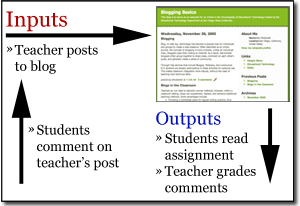 I came across a fantastic article that provides crystal clarity on various blogging techniques that can be employed by teachers. A brilliant piece of expository writing that is well-supported by excellent diagrams (such as the one shown here), this article would be good guide to any teacher in nailing the implementation strategy of her class blog.
Teachers - read and blog away…
That question posed to me by a teacher the other day truly warmed the cockles of my heart (pardon the quaint expression!)…I thought the idea of leveraging her students' new-found interest in poetry through a classroom blog was a brilliant one. Writing poems is just the kind of Language Arts activity that can benefit immensely from a forum for publishing and an audience of readers (for praise and critique) in teachers, parents and most of all, peers.
Blogging in the classroom - it’s a slow but sure trend in urban schools in India - one that I’m happy to fan along in any way I can, because I see such tremendous possibilities in these common platforms for expression and discourse that extend beyond the four walls of the classroom.
Blogs in K-12 can have various purposes – as a quasi-course management site maintained by the teacher alone; or a collaborative platform for sharing ideas by the teacher as well as the students; or a personal space for publishing maintained by individual students that the class (or even the school community at large) has access to. Having used blogs in all these different ways with my students (teachers in professional development programs), I think it’s important for teachers to be aware of the different ways in which blogs can be set up and used – driven, as it were, by the purpose of setting up this collaborative learning space.
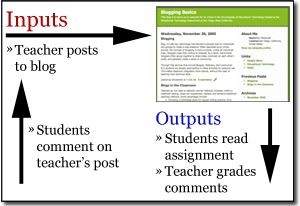 I came across a fantastic article that provides crystal clarity on various blogging techniques that can be employed by teachers. A brilliant piece of expository writing that is well-supported by excellent diagrams (such as the one shown here), this article would be good guide to any teacher in nailing the implementation strategy of her class blog.
Teachers - read and blog away…
Friday, August 25, 2006
"Children, Computers and Powerful Ideas"
 My last post about the PICO Cricket kit and the LEGO Mindstorms brought to the fore thoughts on kids and programming that I have dwelt on ever so often...and the book that started it all (and purportedly inspired many of the early adopters of computers in classrooms as well as legions at the Media Lab in the Lifelong Kindergarten group whose research gave birth to the LEGO Mindstorms and now the PICO Cricket).
It's been over a quarter of a century since 'Mindstorms' (Seymour Papert's seminal book on kids and computers) took the education world by storm. The book was less about teaching with/about/from computers (the topical tensions of technology integration in schools) as it was about allowing kids to be creative through computers. 26 years on, and we rarely see kids in schools using computers in the way Papert envisioned - children programming computers and acquiring "a sense of mastery over a piece of the most modern and powerful technology" and through this endeavor establishing "intimate contact with some of the deepest ideas from science, from mathematics, and from the art of intellectual model building." Is it because Papert's argument was not compelling enough or is the jury still out on the educational benefits of such an endeavor? Or is it because teachers (the vast majority of them anyway), dare not stray into the realm of "geeks" (the popular (mis)perception of people who can program) - in the belief that such activity is way too "hi-tech" for them. I tend to think that it is the latter.
Fortunately for us all, there are some who have not given up on this powerful idea. The simple easy-to-use LOGO programming environment (that Papert and his colleagues created at the MIT Media Lab) is still alive and kicking, and available through various sources. Microsoft's Kids Programming Language (KPL), while not as easy as LOGO, seems promising. Squeak based on Smalltalk has been around for a while, and Scratch, slated to be Media Lab's latest gift to kids and educators (who care to share Papert's view) is a WYSIWYG, iconic LOGO-like programming environment.
With no apparent dearth of kids programming environments and certainly no shortage of computers (what with the $100 laptop soon to become a reality in the developing world), the need of the hour is to get teachers to start playing around in these easy-to-use, fun programming environments, so that they can get over their irrational fear of communicating with computers, and start seeing the thrilling possibilities of these powerful learning tools in their classrooms.
Wednesday, August 02, 2006
Chirp, Chirp! Here come the crickets...
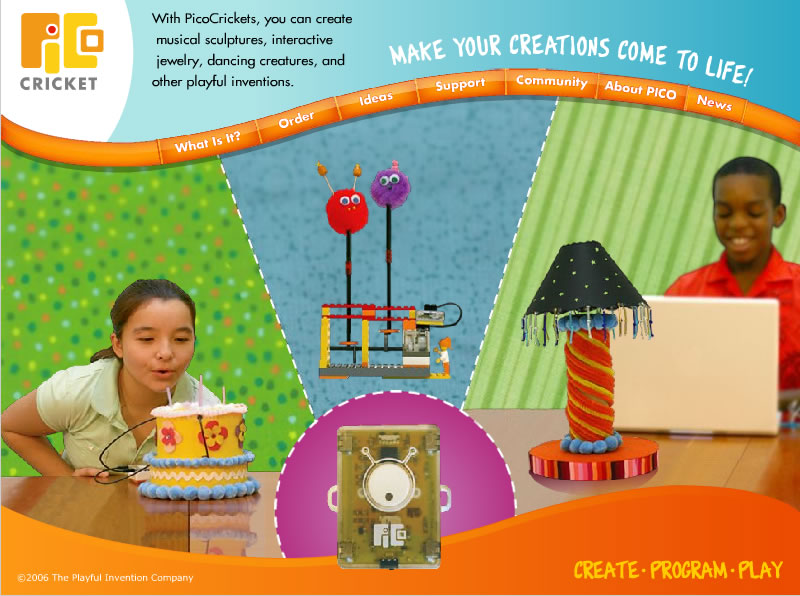 The latest offering to emerge from research at the Lifelong Kindergarten group at MIT Media Lab, has once again got proponents of “hands-on”, creative learning excited in eager anticipation. The PICO Cricket kit, due to be released in the coming weeks presents some thrilling possibilities for informal learning spaces. As someone who volunteered for the workshops at MIT Museum in 2003 during the ‘Playful Invention & Exploration’ (PIE) research project, I have a personal connection as well with this product.
PIE Workshops at the MIT Museum - Pictures of my (then) 6-year old son at the 'e-Insect Invasion' workshop in April 2003
Simply put, PicoCricket is “a LEGO Mindstorms Robotics Kit meets a Klutz Craft Kit” i.e. LEGO pieces + ‘Electronic Thingees’ + Craft materials, where ‘Electronic Thingees’ = a microcomputer (the legendary MIT Media Lab “cricket” encased in a plastic body, much like the LEGO RCX brick), LEDs, sensors & motors. The colorful craft materials range from foam balls to pipe cleaners to straws, beads and buttons. [In the hands of a resourceful, creative individual, the kit could be “enhanced” by any number of “craft materials” from all around us - there is no dearth of plastic and metal knick-knacks that could be recycled to find a new home - and use.]
What differentiates this product from the Mindstorms, is, of course, the emphasis on creativity and craft, which as I see, will serve to bridge the technology gender divide (I speak from first-hand experience – boys have outnumbered girls by far in the after-school Robotics Club I have run for high-schoolers for the past 3 years). It is not only the inclusion of craft materials that sets this apart from the Mindstorms, but also the exclusion of the vast numbers of wheels, axles, tires, treads and hubs, that account for a large percentage of the Mindstorms kit. Kids take one look at the Mindstorms kit and “roving bots on wheels” is probably the first "robot" idea that strikes them. One look at the Crickets kit and kids could think of a zillion different exciting, colorful artifacts. "Arts & Crafts for the Digital Age", is how NYT has described it.
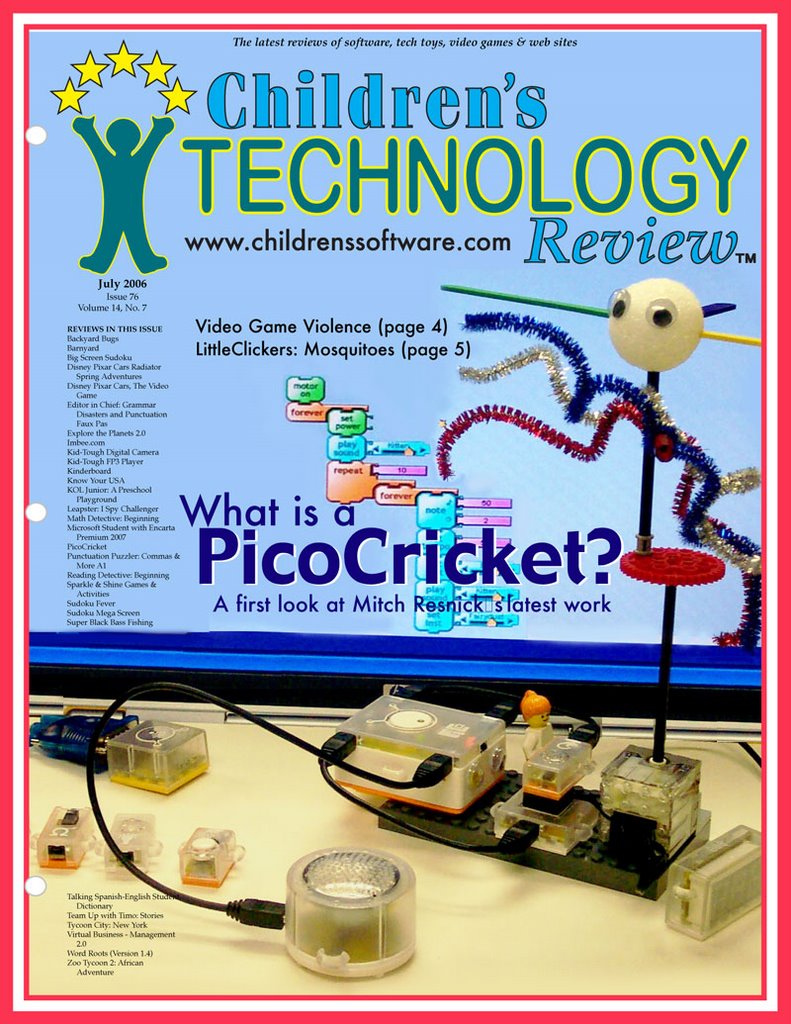 At $250, this kit seems quite pricey (more so for the Indian market), especially given that the LEGO Mindstorms NXT seems to have a lot more (in terms of sheer size of the kit) for the same price; but that has not deterred critics from giving this product a thumbs-up. (I queried Mitch Resnick at the Media Lab about this when he showed me the Cricket kit this past spring; he thinks that bulk production - driven by demand, will hopefully bring down the price some time in the future).
I, for one, cannot wait to get my hands on one of these ...
Thursday, July 06, 2006
On The Social Side of Bookmarking...A Delicious Idea for Teachers & Schools
Consider the following issues teachers in our school (and I’m sure elsewhere as well) are dealing with when trying to use resources on the Internet ---
- They search for websites appropriate for a particular topic they are teaching. They would like to share these with their students in school, but the links sit bookmarked on their computers at home.
- The teachers identify certain useful sites on a computer in school or at home, and bookmark them, but do not have access to the same machine all the time.
- Technology teachers and integration specialists working with teachers in school identify certain useful websites for the teachers they’re working with and need a convenient mechanism to share these with them.
- Teachers of different grades/subjects would like to be able to know what websites other teachers teaching the same subject have found useful in their teaching. If only there were an accessible “database” of useful web links that their colleagues have used or found potentially useful, (as opposed to some the links some strangers somewhere half-way across the globe found useful.)
For all this and more, del.icio.us to the rescue!
Here’s how it would work---
- The tech. staff would set up a common del.icio.us account for the school community to maintain a handy, accessible database of useful web links, as well as for facilitating easy sharing among teachers, tech corordinators, students and anyone else in the school community who would benefit from access to this set of links.
For example, a del.icio.us account with an appropriately friendly username such as “tech_(school-name)” or “weblinks_for_(school-name)” would be set up. - The username and password would be shared with the teaching community.
- Teachers who wish to add a web link to share with students or other teachers, would login and add to the list.
Voila! Teachers now have easy access from anywhere – home, classroom, computer lab, …to this wealth of contextual, school-appropriate set of web links at http://del.icio.us/(whatever username has been set up)
Now for the tagging bit (which is basically a form of information organization, where you associate keywords with any web link)---
- The weblinks added on del.icio.us need to be ‘tagged’ appropriately for search-and-access by the users themselves or even the del.icio.us community-at-large (after all “social tagging” is the big idea!).
- In the case of a school community, teachers could tag the web link with keywords indicative of grade level(s), subject, or topic… that the web link could be used for.
- Teachers wanting to share links with their students, could use del.icio.us and tag a set of links s/he may have identified from the existing list, or added to the list. In this case, the tags could be indicative of the topic or something the teachers and students arrive at jointly.
Having a common understanding, and perhaps even shared “rules” (among teachers and students), of the semantics and syntax used for tagging, would, of course, be key, to making this type of sharing a success.
There are other 'folksonomic' tools such as Clipmarks that do much the same thing as del.icio.us (but I have not tried them yet). There is also a another - wider - aspect to this type of "social tagging" - that which deals with your connection to others across the globe who have tagged the same link as you (most likely other teachers or educators with similar interests), but I'll save that for another post.
Subscribe to:
Posts (Atom)